
An immediate payment from Standard Bank to a Nedbank beneficiary you've already saved, with the details unchanged, is targeted to land in about 60 seconds, and often does within a minute or two. A regular EFT to the same account is a batch instruction that commonly arrives on the next business day or within 1 to 2 business days, and Standard Bank's own wording allows several business days, so it isn't a same-day promise.
It's late on a Friday and a supplier has been chasing an invoice since lunchtime. You open Standard Bank Internet Banking, load the payment into a Nedbank account you've paid before, and the screen shows a successful send. On Monday morning the supplier phones again, and the money still isn't showing.
That gap between the confirmation tick and the credit isn't a glitch. It's the difference between a live instruction and a queued one, and the fix starts with knowing which of those you loaded.
Direct Answer on Standard Bank to Nedbank Timing
There isn't one standard bank to nedbank transfer time. There's a time per payment type, and matching the right one to the instruction you submitted is most of the work.
An immediate payment to an existing beneficiary whose banking details haven't changed should reach the Nedbank account in about 60 seconds, and typically lands within a minute or two. Load a new beneficiary, a one-off payment, or an account whose number you've just edited, and the same rail can take up to about two hours while extra checks run. The immediate-payment service operates 06:00 to 22:00 every day, so a payment submitted after that window may only move the following day.
A regular EFT behaves nothing like that. It joins a batch, waits for the next processing run, and lands when the banking calendar says so, not when you press send. That's why the same Friday afternoon instruction can show as sent on your side while the Nedbank balance sits untouched until Monday.
The Friday rule: an EFT that misses the processing window doesn't start its countdown on Friday. It enters the next business morning's run, and a public holiday on that Monday pushes it out again.
Two things follow from this. First, the rail you pick matters more than the hour you pick it, although both matter. Second, the only reliable estimate is the payment type and availability date shown on the confirmation screen before you approve. A generic search result quoting "one day" tells you nothing about which rail it assumed.
The rest of this guide splits the rails apart, sets out the calendar rules, works a Friday send through by hand, and gives you a tracking sequence for the payment that still hasn't arrived.
Transfer Times by Payment Type
Match the row below to the payment option you selected in Standard Bank Internet Banking, the app, or Business Online, before you confirm anything.
| Payment type | Expected time | Operating window | Main catch |
|---|---|---|---|
| Regular EFT before cut-off | Commonly 1 to 2 business days; Standard Bank says several business days | One-day BEFT cut-off 16:00; two-day BEFT cut-off 14:30 | Not a guaranteed same-day payment |
| Regular EFT after cut-off, weekend or public holiday | Next business processing day, longer across holidays | Business-day processing 08:00 to 15:30 | Friday after cut-off waits for the next business morning |
| Immediate payment, existing unchanged beneficiary | About 60 seconds, often a minute or two | 06:00 to 22:00 every day | Fee may apply; wrong or restricted accounts can still fail |
| Immediate payment, new, one-off or changed details | Up to about 2 hours | 06:00 to 22:00 every day | Payment after 22:00 may wait until the next day |
| PayShap | Real-time and irrevocable when the payment qualifies | Both banks participate; limit R50 000 from October 2024 | Not a route for foreign-currency or cross-border supplier payments |
The slow rows are slow for a reason
A regular EFT is a file, not a message. Your instruction is collected, validated and released in a processing cycle, which is why Netcash reports that standard EFT transfers between different South African banks typically take 1 to 2 business days to reflect. Standard Bank's own documentation is looser still, allowing several business days, so don't tighten that into a guarantee it never made.
The business BEFT menu adds another layer, because it separates one-day, two-day and next-day services to "all banks", a category that includes Nedbank. Pick the one-day service and you get a later cut-off of 16:00, but still only next-business-day value. Pick two-day and the 14:30 cut-off closes earlier than expected.
The fast rows depend on the beneficiary, not the clock
The 60-second figure applies to a beneficiary the bank already knows and trusts. According to Standard Bank's immediate payment guidance, an existing beneficiary whose banking details have not changed should receive a successful immediate payment within 60 seconds, and the bank describes the normal experience as "a minute or two". The same page confirms that a one-off payment, a new beneficiary, or one whose details have changed can take up to two hours, and that payments after 22:00 may not be processed until the following day.
Those are service targets, not an unconditional guarantee. Payment validation, fraud controls, outages, account restrictions and a mistyped account number can still delay or reject the instruction. The fee is the other factor: Standard Bank notes that immediate payment may carry a charge based on the payment amount, so the honest comparison is speed against cost, not speed alone, as set out in the bank's immediate payment FAQ.
Where PayShap sits
PayShap is a separate real-time rail with its own limit and its own recovery rules, and it deserves more than a table cell. Treat it as a domestic rand option for eligible payments, not a replacement for every EFT you send.
Note what the Nedbank figures do and don't describe. Nedbank's published timings cover payments sent from a Nedbank account to another bank, so they aren't used here as the Standard Bank to Nedbank estimate. They do matter for the recipient who pays you back.
If part of your job is proving what left the account and when, converting Absa statements with BankStatementWizard gives you a filterable record you can match against a supplier invoice line by line, which settles most payment disputes faster than a phone call.
Cut-Offs Holidays and Real Send Dates
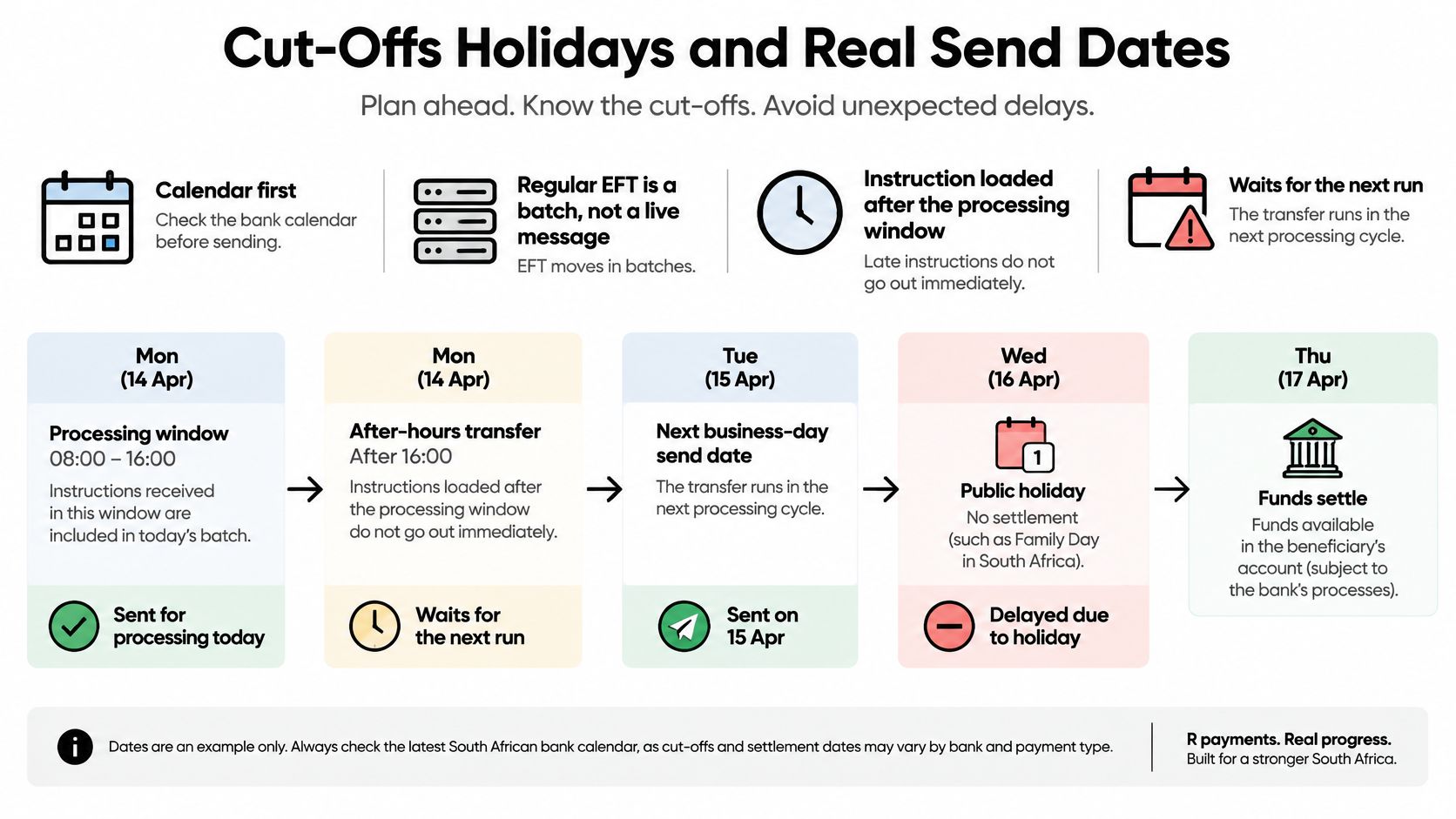
Here's the part generic answers skip. A regular EFT doesn't travel when you press send. It joins a queue, and the queue only runs on business days inside a defined window.
The calendar rules in one place
Processing hours: Standard Bank's business payment documentation describes normal processing as 08:00 to 15:30 on business days, and states that transactions received after that window are processed on the following business day. That single sentence explains most "missing" payments.
Cut-offs vary by service. The same documentation lists BEFT options with a 16:00 cut-off for the one-day service and 14:30 for the two-day service, with domestic treasury transfers closing earlier than some 24-hour categories. Whatever the payment type, the same rule holds: after the window, the instruction waits.
Business days exclude weekends and public holidays. Saturday and Sunday never count. Neither does a South African public holiday, and consecutive holidays stack on top of each other. That's why Nedbank's EFT guidance warns that an instruction processed after cut-off, on a public holiday, or across consecutive public holidays can take up to 3 business days to reflect.
Put plainly, a transfer quoted as "one day" in a search result can be three or four calendar days once a weekend and a holiday sit between the send and the credit. For payroll, supplier settlement and refunds, that difference is cash flow.
The Friday 16:10 case, worked through
This is the question worth answering properly: if I send from Standard Bank at 16:10 on a Friday, when exactly should the Nedbank recipient expect the money?
At 16:10 you've missed the 16:00 one-day cut-off and you're well past the 08:00 to 15:30 processing window. So Friday's cycle is closed. Your payment joins the next business-processing run, which is Monday morning, assuming Monday isn't a public holiday. The Nedbank account should show the funds during Monday's processing, not on Friday night.
The confusion comes from the sender's screen. Standard Bank can legitimately show the instruction as submitted and accepted on Friday evening, because it was. Your money hasn't vanished and nothing has failed. It is queued, and the queue opens Monday. If that Monday is a public holiday, the run moves to Tuesday, and if the Tuesday is also a holiday, later still.
Three more send times
- Monday 09:30, one-day EFT to a saved Nedbank beneficiary: you're inside both the processing window and the 16:00 cut-off, so plan for Tuesday value. If the recipient needs it Monday, EFT was the wrong rail.
- Sunday 19:00, immediate payment to an unchanged beneficiary: the immediate window runs on any day, so this one is measured in about a minute. The same payment as an EFT would wait for Monday's batch, which shows that the rail, not the weekend, set the outcome.
- Wednesday 21:30, immediate payment to a new beneficiary: still inside the 06:00 to 22:00 window, so allow up to two hours for the extra checks. Start the same instruction at 22:10 and it may not process until the next day.
Payroll files have an earlier deadline
Salary runs feel like EFTs but behave like deadlines. A Thursday payroll file released after the 14:30 two-day cut-off can miss Friday value and land on Monday, which means staff are paid late even though finance released the file on Thursday. Work backwards from the value date you need, not forwards from the day you're sitting at the screen.
Practical habit: before you leave the confirmation screen, write the expected value date next to the payment reference. It takes ten seconds and it ends the "but I sent it" conversation.
When Immediate Payment or PayShap Beats an EFT
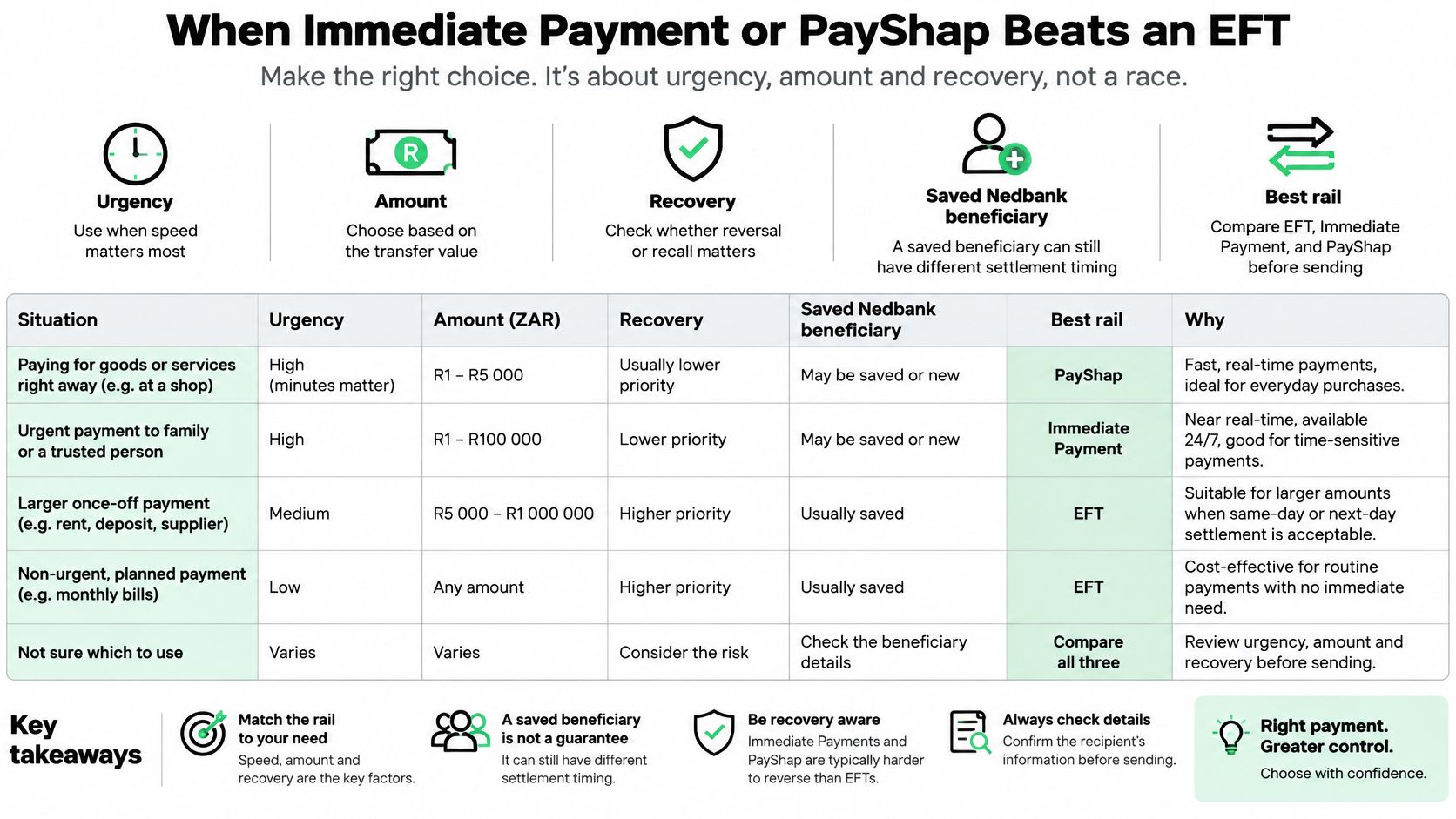
Speed isn't the only variable. Urgency, amount and how recoverable the money is once it lands decide the rail, and the fastest option isn't always the right one.
| Situation | Better option | Why it fits |
|---|---|---|
| Saved beneficiary, needed during 06:00 to 22:00 | Immediate payment | About a minute when details are unchanged |
| New or just-edited Nedbank details | Immediate payment with a two-hour buffer | Extra checks apply before release |
| Under R50 000 and eligible for instant send | PayShap | Real-time and irrevocable between participating banks |
| Large payroll or scheduled supplier run | Regular EFT on a one-day service | Sent before the listed cut-off for next-business-day value |
| After 22:00 or on a public holiday | Next business-day EFT, unless an instant option is still open | The immediate window may already be closed |
| Foreign-currency supplier or FX conversion | Not these domestic rails | EFT and PayShap move rand between local accounts |
For a saved Nedbank beneficiary where the money must land during the working day, immediate payment is the standard route, with a two-hour allowance whenever the details were just added or edited. Pre-validate the account name, branch code and account number against the invoice before you send. Those checks are exactly what stretches a minute into two hours when something doesn't line up.
PayShap covers the always-on case. Stitch's guide to South African payment rails describes it as designed for real-time, irrevocable transfers between participating banks, with Standard Bank and Nedbank both listed among participating institutions in the Rapid Payments Programme ecosystem. The same guide notes that PayShap's transaction limit was increased to R50 000 in October 2024, which widened its use for mid-value domestic payments.
That limit is the boundary. A R200 000 payroll batch doesn't move on PayShap, and no instant rail here converts currency or pays a foreign supplier. Those are separate jobs.
If you want to hear how South African finance teams think about payment rails in practice, this discussion covers the trade-offs directly.
Instant rails also price differently, cap the amount, and are harder to recall once they succeed. A batch EFT leaves you a little room before it joins a run. That asymmetry matters when a supplier disputes the invoice the day after you paid it.
The one-line rule: if the rand payment is domestic, eligible and urgent, use a verified instant rail. If it's large or scheduled, use EFT and respect the cut-off.
How to Track a Payment That Has Not Arrived
Before you phone anyone, work through six checks in order. Most "missing" payments are sitting in a batch that hasn't run yet, and the checks tell you which situation you're in.
- Open the sent-payment or proof-of-payment view. Confirm what the record shows rather than what you remember tapping.
- Read the payment type. EFT, immediate payment and PayShap fail in different ways. A pending batch is not a failed instant payment.
- Compare the timestamp to the cut-off. Then skip weekends and public holidays before deciding it's late.
- Check the beneficiary details against the invoice. A new or edited beneficiary follows the two-hour path, and a wrong account number can reject outright.
- Copy the reference and amount exactly. The Nedbank account holder searches their statement by that reference, not by your narration in the app.
- Ask the recipient to check pending as well as posted transactions. The sending bank can show success before the receiving balance updates.
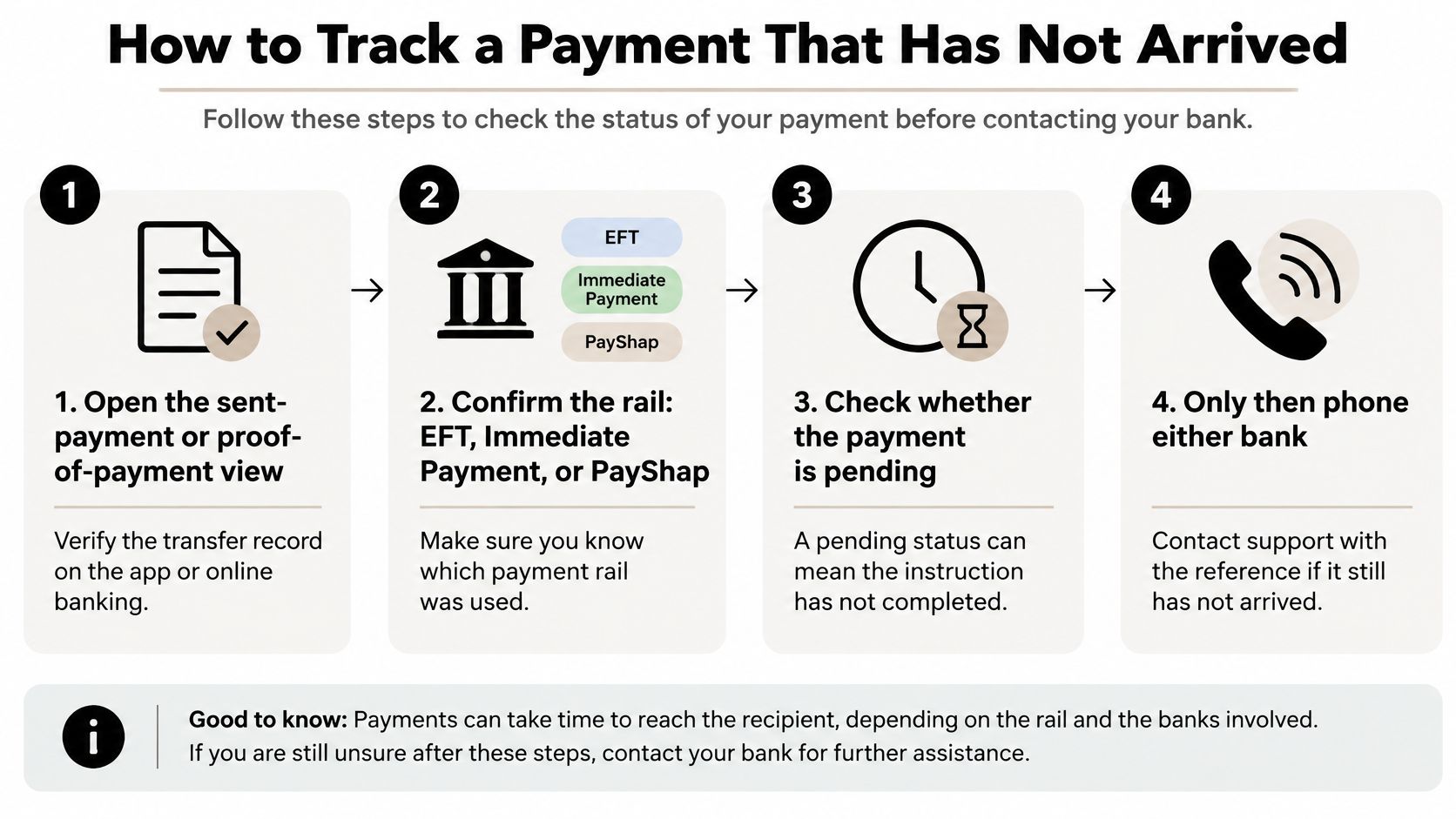
If the expected window has fully passed, contact Standard Bank with the reference and ask a direct question: was the item processed, returned, or held? Only after that answer should you ask Nedbank to trace an inbound credit. Going to the receiving bank first usually sends you back to the sender.
Real causes versus impatience
Genuine delays come from beneficiary verification, fraud controls, account restrictions, a bank outage, a public holiday, or a payment created after 15:30 (EFT) or after 22:00 (immediate payment). Ordinary timing is the other explanation: Netcash notes that bank EFTs in South Africa can take 24 to 48 hours to reflect, depending on the payer's bank and transfer timing, per its bank EFT payment method overview. If you're still inside that window, nothing has gone wrong.
Don't send a second payment while the first is inside its window. Instant and PayShap credits are difficult to reverse once they land, so a duplicate creates a recovery problem on top of a timing question.
If the missing money is a refund rather than a transfer, the same discipline applies to chasing it: claim missing credits with Smart Receipts walks through the evidence trail a provider will ask for.
Keep this: if the proof says immediate and the beneficiary was already saved, look within minutes. If it says EFT, look on the next business day first.
Confirm the Rail Before You Pay
Everything above collapses into a send check you can run in under a minute, and it replaces the vague hope that a batch will somehow move faster for you.
Read the payment type and the beneficiary status together. The rail sets the window, and the beneficiary decides whether extra checks apply. A saved, unchanged Nedbank account is the fastest domestic path. A beneficiary you've just edited is not, no matter which rail you choose.
Write down the value date that follows from the cut-off and the calendar. That date, not the moment you pressed send, is what payroll and your supplier's terms are measured against.
Compare that date to the deadline. If it misses, and the amount and time still qualify, switch to immediate payment or PayShap. If it doesn't miss, stay on EFT and don't pay an instant fee for speed you don't need.
One boundary holds all of this together. These times describe domestic rand movements between two South African banks. They don't set the timing for paying an overseas supplier, receiving export proceeds, or converting currency. On a cross-border job, the local EFT is only the funding leg. If your team is new to sending money beyond the border, this wire transfer guidance for non-resident founders sets out the account-detail basics before you build the payment run. Zaro handles the wider flow, and as an authorised Financial Services Provider registered with the FSCA (FSP number 55133) it makes cross-border transactions as easy as local EFTs, with funds from the US typically reaching a South African account in a matter of minutes.
Keep the proof of payment until the Nedbank credit appears. It's the one record that answers every question asked afterwards.
When a supplier or contractor sits outside South Africa, the local rail only gets your rand as far as the border, and that's where Zaro takes over. You fund your ZAR and USD accounts by standard bank transfer, then pay and receive across borders at the live rate, with the process built to feel as straightforward as the EFT you just scheduled. If cross-border settlement is part of your month, visit Zaro and see how the corridor you use prices out.