
Standard Bank to Standard Bank transfers aren't eligible for Immediate Payment, while immediate payments to other banks usually clear within 60 seconds. Regular EFTs can take several business days, depending on the payment route and processing window.
That can feel counterintuitive when you're paying a supplier, moving money between business accounts, or waiting for a customer's payment to reflect. You might reasonably expect two Standard Bank accounts to update instantly because both accounts sit inside the same banking group.
Sometimes they do. Sometimes the transaction is handled through a different payment option, beneficiary workflow, or processing queue, and the balance doesn't appear when you expect it to. The key is to separate an internal ledger movement from a payment that enters an interbank clearing process. Those two routes can look similar in an online banking app, but they operate very differently behind the scenes.
Understanding Standard Bank Transfer Expectations
A small exporting business finishes a supplier payment on Friday afternoon. The owner sends money from one Standard Bank account to another, receives a confirmation screen, and tells the supplier the order can be released. An hour later, the supplier still cannot see the funds. The owner checks the account, considers sending the payment again, and risks creating a duplicate.
The problem begins with a reasonable assumption: same bank means instant. A simple transfer between accounts held at the same institution may appear immediately, yet that outcome is not guaranteed for every Standard Bank to Standard Bank payment. The instruction might still require beneficiary checks, account validation, security review, or processing through a payment queue.
Why the recipient may not see the money
A confirmation shows that Standard Bank accepted the instruction. It does not necessarily show that the recipient's balance is ready for use. The bank can record the sender's instruction first, complete additional checks, and update the beneficiary's available funds later. In the banking app, those stages may look like one completed action, which makes the waiting period confusing.
Standard Bank's Immediate Payment guidance states that Immediate Payment is unavailable for Standard Bank to Standard Bank payments. It also explains that immediate payments to other beneficiaries usually go through within a minute or two. That option therefore cannot be used to make a same-bank payment arrive faster.
Businesses should treat a submitted payment as pending until the recipient confirms that the funds are visible and usable. This matters when a supplier needs cleared money before releasing stock, dispatching an order, or continuing work. Check the payment type, beneficiary details, and recipient account rather than relying on the sender's confirmation screen alone.
Practical rule: A payment confirmation proves that the bank received your instruction. It does not always prove that the beneficiary can spend the funds yet.
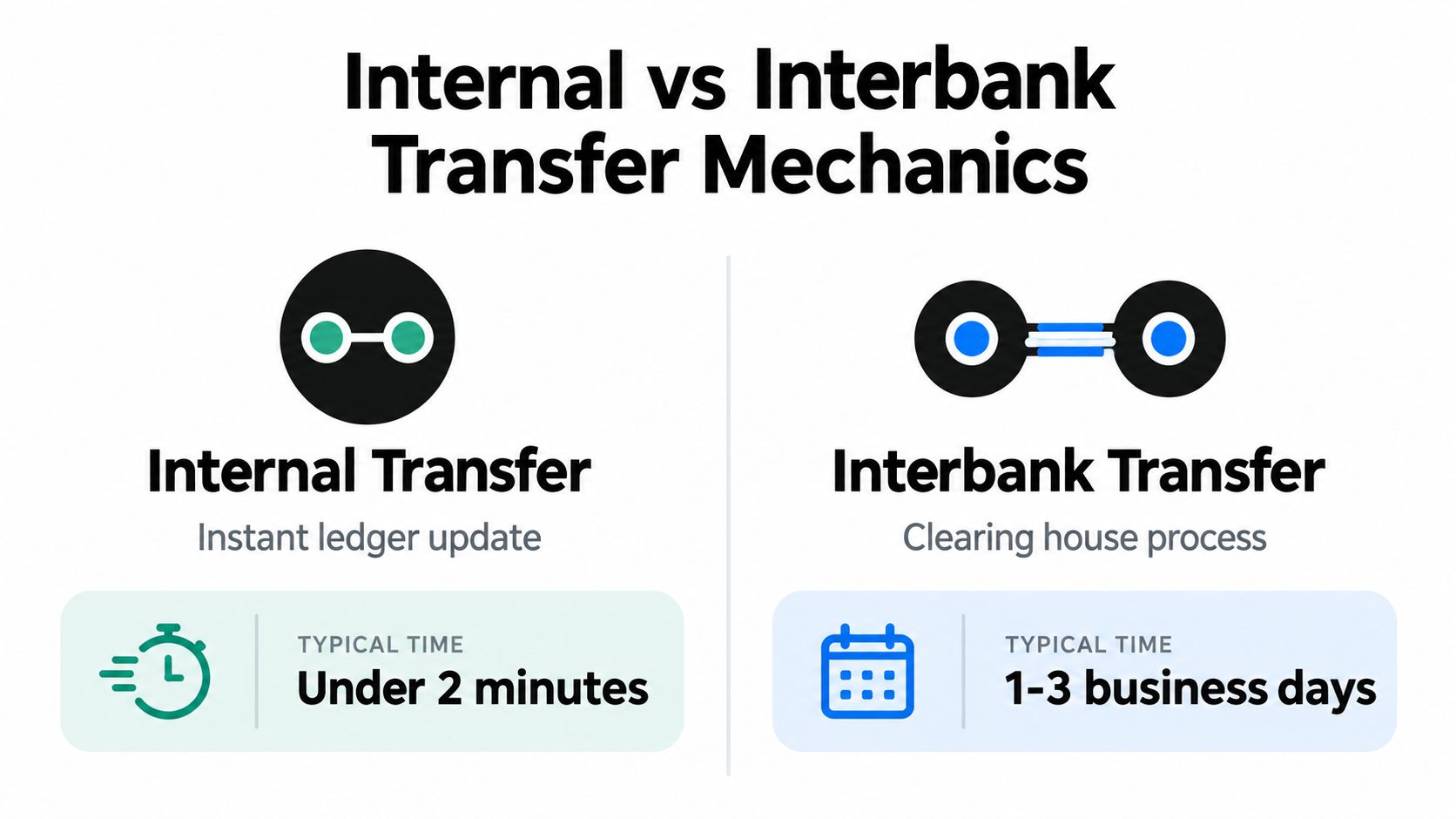
Internal vs Interbank Transfer Mechanics
Think of Standard Bank's internal ledger as one company's stockroom. If one department transfers a box to another department in the same building, staff can update the inventory record directly. No outside warehouse, courier, or receiving company needs to reconcile the movement.
An internal account transfer can work in a similar way. Both accounts are recorded within the same institution, so the bank may update its own ledger rather than sending a payment instruction through the national interbank clearing chain. That's why a correctly set-up internal movement can feel immediate.
An interbank payment is different. The money must leave one institution's ledger, pass through a clearing arrangement, and reach another institution's ledger. A South African EFT timing explanation describes standard bank-to-bank EFTs as batch-processed, with same-bank transfers often posting immediately and interbank payments commonly clearing in 1 to 2 business days. Cut-off times, weekends, and payment queues can extend the wait.
The ledger analogy in practice
Suppose your company has a Standard Bank operating account and a separate Standard Bank account used for payroll reserves. A transfer between them may remain inside the bank's internal records. By contrast, paying a contractor at another bank requires an external clearing step, even if you initiate both payments from the same dashboard.
The beneficiary details also influence the route. Selecting an immediate-payment option, using a saved beneficiary, or sending a normal EFT can produce different timing because the bank applies different controls and settlement rules.
The important question isn't only, “Are both accounts with Standard Bank?” Ask instead, “Which payment rail did the instruction use?” That answer gives you a more useful forecast than the bank name alone.
The following video offers a visual introduction to how bank transfers can move through different payment systems.
Navigating Immediate Payment Options
A supplier may be waiting for payment while your banking screen offers several routes. Choosing the right one starts with the destination, because a transfer between Standard Bank accounts can move across the bank's internal ledger, while a payment to another bank must enter an interbank clearing system.
Standard Bank's South African help page explains that Immediate Payment is not available for Standard Bank to Standard Bank payments. It is intended for qualifying payments to beneficiaries at other banks. Use this five-step check before authorising an urgent instruction:
- Identify the receiving bank. Confirm whether the beneficiary uses Standard Bank or another institution. The bank name determines which payment route can apply.
- Check the beneficiary record. Review the account number, branch details, and beneficiary status. As noted above, new or recently changed beneficiary details can add a verification wait.
- Review the payment method. Select Immediate Payment only when the destination and payment type qualify. A standard EFT follows a different clearing path, while an internal transfer stays within Standard Bank's own records.
- Confirm the recipient's account details. One incorrect digit can send the instruction into rejection or investigation. A faster payment rail cannot correct inaccurate information.
- Set the recipient's expectation. Tell the supplier whether you sent an internal transfer, a standard EFT, or a qualifying immediate payment. This gives them a useful explanation if the funds do not appear at once.
The distinction works like two roads leaving the same office. An internal transfer updates two accounts in one institution's ledger. An interbank payment must pass through an external clearing process, so selecting the route matters more than seeing Standard Bank on the sending side.
Processing Windows and Cut-off Times
A payment can be technically valid and still wait for the next processing window. This is easiest to understand with a workplace analogy. If your business sends documents to a dispatch team after that team's collection run, the documents don't travel until the next scheduled collection. Banking systems use similar windows for certain payment instructions.
Standard Bank's operational information says RTC payment instructions should ideally clear within 60 seconds, depending on transaction volumes and prescribed processing windows. It also states that normal processing runs from 08:00 to 15:30 on business days, as described in the Standard Bank operational report.

What changes the expected settlement date
Business owners should schedule payments with the calendar in mind, not just the moment they click “send”.
- Business-day windows: A payment submitted outside the relevant operating window may wait for the next available processing cycle.
- Weekends and public holidays: Normal processing windows exclude these days, so a payment sent late before a break may not move until banking operations resume.
- Payment type: RTC or other immediate rails can behave differently from ordinary EFT processing.
- Transaction volume: Even a fast payment instruction can depend on system volumes and the applicable processing window.
For recurring supplier payments, create a payment timetable that includes approval time, bank processing time, and the recipient's own reconciliation process. This is especially important when invoices are due around weekends or public holidays. Sending earlier can prevent a payment that is valid, but operationally late.
Comparing Payment Processing Methods
Businesses usually choose between speed, predictability, and simplicity. A normal EFT may suit a planned supplier payment where the recipient doesn't need funds immediately. An eligible immediate payment is more appropriate when a delay could interrupt a delivery, release, or service.
| Payment Type | Processing Time | Availability |
|---|---|---|
| Standard Bank to Standard Bank internal transfer | Often immediate when processed as an internal ledger movement | Not every internal payment qualifies for Immediate Payment |
| Immediate Payment to another beneficiary or bank | Usually near real time for qualifying payments | Available only for eligible payment routes |
| New or amended beneficiary payment | May require additional processing and safety checks | Timing depends on verification |
| Regular EFT | Business-day or batch-based processing | Available for standard EFT instructions |
The table is a decision aid, not a promise. Beneficiary details, cut-off windows, account rules, and security checks can change the outcome. A finance team should record the payment method in its approval notes so the person waiting for the funds knows what “sent” means.
Choosing the right route
Use a normal EFT for planned transactions where the settlement window fits your supplier agreement. Use an eligible immediate option when the payment is time-sensitive and the beneficiary route supports it. For a Standard Bank to Standard Bank payment, first confirm whether the transfer is an internal movement, because the bank's Immediate Payment option isn't available for that pairing.
Cost and operational support also matter. Teams building broader payment workflows may find it useful to review resources on how to deploy AI in banking with SupportGPT, particularly when customers need clearer answers about payment status and expected settlement.
Troubleshooting Transfer Delays
Start with the transaction record, not the recipient's assumption that nothing happened. Open the payment history and check the status, beneficiary name, account details, payment type, submission time, and any message requesting additional verification.
Then work through the likely bottleneck:
- Match the beneficiary details. Compare the account number and beneficiary record with the recipient's confirmed details. Don't send a second payment until you know the first instruction failed or was reversed.
- Check the payment route. Determine whether you used a normal EFT, an internal transfer, or an immediate-payment option. The route determines which timing expectation is reasonable.
- Review the beneficiary history. New or amended details can lead to safety checks. A delay in this situation doesn't necessarily mean the funds are lost.
- Check the calendar and submission time. A payment entered after a processing window, or before a weekend or public holiday, may remain pending until the next business-day cycle.
- Ask the recipient to check the correct account. Businesses often have operating, savings, trust, or foreign-currency accounts. A payment may be in a different account from the one the recipient is monitoring.
- Contact Standard Bank if the status is unclear. Keep the payment reference, amount, beneficiary information, and submission details ready. Bank support can investigate a specific instruction more effectively when you provide the full record.
Don't rely on a screenshot as final proof of settlement. Ask the recipient to confirm that the funds are available, especially before releasing goods or treating an invoice as paid.
If the account details were changed unexpectedly, pause the transaction and verify them through a trusted channel. A telephone number or email in a new invoice may not belong to the supplier. Independent confirmation protects the business from both processing errors and payment fraud.
Optimising Cash Flow Management
Transfer timing becomes a cash-flow problem when a business treats every payment as if it follows the same route. A better process assigns each transaction a timing category before approval: internal movement, urgent external payment, planned EFT, or payment requiring beneficiary verification.
That classification helps finance teams decide when to send money and what evidence to request. It also makes supplier communication more precise. “The EFT was submitted” is different from “the beneficiary confirms the funds are available”.
Build timing into daily controls
A practical operating routine can include:
- Morning review: Check payments due that day and identify anything affected by a weekend or public holiday.
- Beneficiary check: Flag new or amended beneficiary records before an urgent payment is needed.
- Approval deadline: Set an internal cut-off before the bank's processing window, leaving time for a second approver.
- Reconciliation check: Match outgoing payments with recipient confirmations and bank statements.
- Liquidity buffer: Keep enough working capital available for obligations that may settle later than expected.
For cross-border businesses, the local bank transfer is often only the first step. A South African company may need to fund a foreign-currency balance, pay an overseas contractor, or settle a supplier invoice after the local transfer has cleared. Zaro lets businesses fund ZAR and USD balances through standard bank transfers, then manage global payments with multi-user controls and transaction visibility.
The core lesson is simple: the standard bank to Standard Bank transfer time depends on the payment route, not only the two account names. Treat internal ledger movements, immediate payments, and regular EFTs as separate processes. That approach gives your team better supplier communication, fewer duplicate payments, and a more reliable view of available cash.
Visit Zaro to see how its ZAR and USD funding accounts can fit into your business payment process. If your company manages supplier invoices, international contractors, or export proceeds, review the platform's controls and cross-border payment workflow alongside your existing Standard Bank procedures.