If your banking app says you can send a payment, why might the bank still ask for documents or another approval before releasing it?
The gap is between permission to submit a payment and permission to process it. Your displayed limit is only part of the picture. The account mandate, recipient settings, payment channel and national payment rules can all affect what happens next.
For South African businesses, a lower visible cap doesn't necessarily mean a larger payment has been refused. It may mean the bank needs to move it into a documented approval process. Whether you're checking a Standard Bank transfer limit or planning an international supplier payment, start by identifying which control applies.
Which Limit Applies to Your Transfer
There's no single standard bank transfer limit that applies to every account and payment. The amount you can send is controlled by several layers, and changing one doesn't automatically change the others.
Say your business needs to pay a supplier. Your account balance covers the invoice, and the payment fits within your daily allowance. It could still require intervention because the recipient has a lower beneficiary limit, or because the channel you're using doesn't support that amount.
Transfer limit types and what each one controls
| Limit type | What it caps | Where you see it | Who can change it |
|---|---|---|---|
| Per-transaction limit | Maximum for one payment | Transfer settings in the app or internet banking, where displayed | Bank, on request |
| Daily limit | Total sent during the bank's defined daily period | Profile or banking limits screen | Bank, often through the app or branch |
| Beneficiary limit | Cap tied to one saved recipient | Beneficiary setup screen, where supported | Bank, after verification |
| Channel limit | Separate caps for app, web and branch | Channel settings or confirmation from the bank | Bank |
| Regulatory threshold | Trigger for extra information, not a customer spending cap | Bank requests and FIC or SARB rules | Not adjustable by the customer |
Think of separate controls, not one allowance
A per-transaction limit is like the maximum size of one cheque. A daily limit is the total value of the cheques you can write during the bank's daily accounting period. A regulatory threshold is the point at which the bank needs particular information or paperwork, rather than permission to spend more.
That distinction matters when you're troubleshooting. Raising the daily allowance won't resolve a recipient restriction, and updating a beneficiary won't remove an account approval requirement.
Don't assume that a daily allowance always means a rolling period measured from your last payment. Ask when your bank resets it and which payment types count towards the total.
Practical rule: The lowest applicable monetary cap determines whether you can submit the payment automatically. Information and approval checks can still apply after you submit it.
Before a large transfer, identify the payment type, sending account, recipient, and channel. Those details enable the bank to answer the important question: not just what your limit is, but whether this payment can proceed through this route.
National Thresholds That Change How Payments Are Handled
National payment rules and your bank's customer limits answer different questions. The bank controls what you're authorised to initiate through your account. National rules govern matters such as payment classification, information requirements and settlement arrangements.
The SARB Common Monetary Area position paper classifies an EFT not exceeding R5 million as low-value and an EFT above R5 million as large-value, and reports a historical R500,000 item limit for EFT debits.
National thresholds and what each one triggers
| Threshold | Amount | What it triggers | Applies to |
|---|---|---|---|
| Customer due diligence | From R5,000 for a single transaction | Applicable customer checks, potentially including supporting documents | Customers subject to FIC Act checks |
| Cross-border EFT information | Above R10,000 per transaction | Capture and verification of prescribed originator and beneficiary details | Cross-border EFTs |
| Low-value EFT ceiling | Up to R5 million | Low-value classification within the relevant retail-payment framework | Relevant domestic and CMA EFT arrangements |
| Large-value EFT | Above R5 million | Large-value classification, potentially requiring different settlement procedures and approvals | Large-value transfers |
| EFT debit item limit | R500,000 | Historical item limit reported by SARB | EFT debit instructions |
The customer-information requirements are separate from the settlement classifications. Due diligence doesn't automatically mean enhanced due diligence, and crossing an information threshold doesn't by itself prohibit a payment. The bank must determine which checks and documents the transaction requires.
A payment-system boundary isn't an account allowance
Consider a hypothetical supplier payment just below the low-value ceiling. It can remain low-value under the payment-system classification while exceeding your business's online daily allowance. The bank may need to approve a limit increase even though the payment hasn't crossed into large-value handling.
Now consider a payment above that ceiling. A larger online allowance alone may not resolve it. The bank may need to select an appropriate settlement route, involve its payments or treasury team, and complete additional checks.
The historical debit limit also shouldn't be read as the limit for an ordinary supplier EFT credit. A debit instruction and a credit transfer aren't interchangeable payment types.
For planning, check your account's per-transaction and daily caps first. Then establish whether the payment is cross-border and what information it needs. For a substantial amount, ask the bank to confirm its payment-system classification and settlement process before committing to a payment date.
How to Check Your Standard Bank Limits
A transfer limit works like a stack of gates: the profile cap, the channel cap, any recipient control, the daily allowance left, and for business accounts the authority to release. The smallest applicable gate decides what can be submitted. Standard Bank limits and menu labels can differ by account, profile and channel, so check the exact account and route you will use instead of relying on a remembered allowance.
If the visible cap sits below your planned amount, read it as a routing signal. The payment has usually moved into a documented approval path, with clearer questions about purpose, mandate and timing.
Check the payment settings
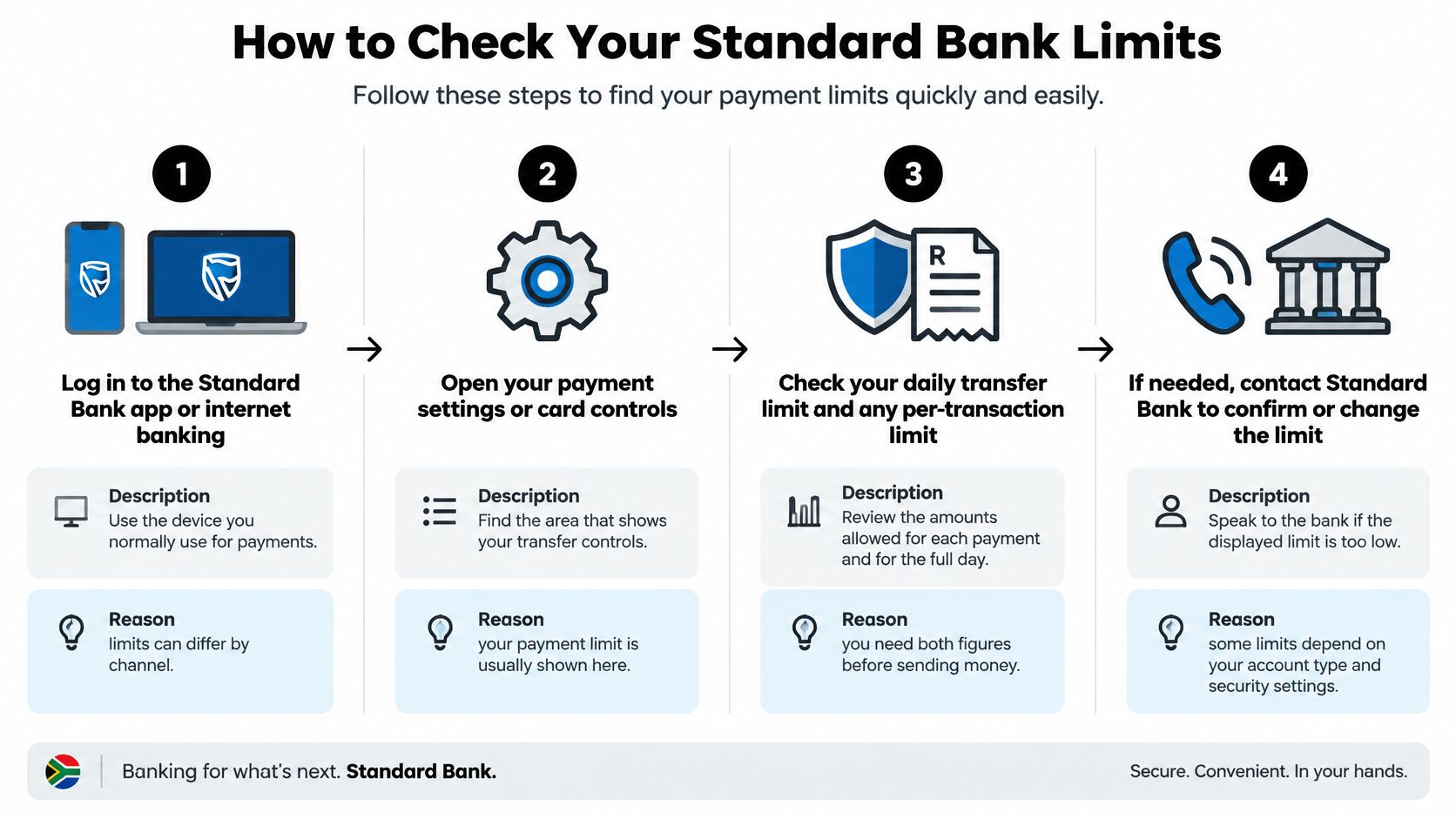
Log in through your usual payment channel. Open the Standard Bank app or internet banking yourself, using your normal secure access method. A figure shown for one channel should not be assumed to apply to another.
Find the payment or transfer controls. Look for payment settings, profile limits or the relevant account controls, as available in your profile. Keep EFT limits separate from card purchase and cash-withdrawal limits.
Record each relevant allowance. Look for the per-payment and daily amounts, plus any separate international or business-payment controls. If the screen shows only one figure, ask what that figure covers rather than treating it as an all-purpose allowance.
Open the intended beneficiary's profile. Check for a recipient-specific limit or restriction, where supported. Confirm you are using the correct saved recipient, particularly if the supplier has separate local and foreign-currency payment instructions.
Compare the payment with your remaining allowance. Review payments already made during the applicable daily period. Your configured maximum and the amount still available to send can differ once earlier payments are counted.
Ask the bank to resolve anything missing. Call the number on the back of your card, use an authenticated support channel or visit a branch. Specify the account, payment type and channel so the answer relates to the transfer you are preparing.
Record an answer you can use
Write down the result in a way that helps you act: which cap is lowest, which channel it applies to, how much of the daily allowance remains, and when that allowance resets. Keep a secure note of the confirmed limits and any support reference. If you save a screenshot, store it with restricted access and avoid including unnecessary account details.
For a business account, also establish whether the displayed allowance belongs to the company, the individual user or an approval role. Someone may be able to capture a payment without having authority to release it, which can make an adequate-looking limit still produce a hold at release time.
You can also view the accompanying walkthrough while checking your own banking profile.
A useful result is a clear payment instruction: the amount you can submit, the channel you can use, the remaining allowance and the date and time it resets. Ask separately about processing cut-offs and expected settlement, because a sufficient limit does not establish when the recipient will receive the funds.
How to Request a Higher Transfer Limit
A higher limit is sometimes available through self-service settings. A substantial increase works differently: it becomes an approval request, and the bank assesses the account mandate, the payment's purpose and the processing route it requires.
Two separate controls sit behind that request, and it helps to keep them apart. National payment rules classify transfers by size for settlement and reporting purposes, but that classification does not set your online banking allowance. The bank does, per account and per user. Each layer has its own key.
Prepare a complete request
State exactly what you need. Contact Standard Bank through an authenticated channel and give the payment amount, intended date, recipient type and reason. Explain whether you need a temporary increase for a particular obligation or an ongoing allowance for routine business payments.
Prepare the supporting file. Have the supplier invoice, contract or payroll schedule ready, together with identity and company-registration documents if requested. Check that the payer, recipient, currency and payment purpose agree across the documents. A mismatch between the invoice and the payment instruction is a common reason an otherwise valid request stalls.
Confirm the approval mandate. Ask whether another authorised user must approve the limit change or release the payment. For company accounts, make sure the necessary approvers have access and will be available before the deadline.
Allow for compliance and routing checks. For international payments, ask whether an authorised dealer must process the transaction and whether exchange-control permissions are needed. Acceptance of a limit request does not mean every other approval is complete.
Record the outcome. Keep the reference number, approved allowance, effective time and expiry conditions. Confirm whether a temporary increase will revert automatically or whether you must request a reduction.
Choose the right next action
If only your self-service allowance is too low, request the appropriate change. If the account mandate prevents release, involve the authorised signatories. If the bank requires another settlement route, ask its payments team to arrange that route rather than repeatedly retrying the app.
A lower visible cap can mark the boundary of self-service banking, not the bank's final decision on whether a documented payment can proceed.
For payroll and contractor batches, confirm whether approval applies to the batch total, individual instructions or both. Don't divide a single obligation to evade information requirements or bank controls.
Be cautious when someone pressures you to increase a limit immediately. Open the banking channel yourself and verify the request independently, rather than using a link or telephone number supplied in an unexpected message.
Why Payments Get Blocked Below Your Limit
Start with the running daily total. A payment may fit below the configured maximum while exceeding what remains after earlier transfers. That's a straightforward check to make before changing settings or resubmitting the instruction.
A different problem arises when the bank can accept the amount but can't complete its information checks. Under SARB's Electronic Funds Transfers Directive 1 of 2022, cross-border EFTs above R10,000 per transaction require prescribed originator and beneficiary information to be captured and verified, while customer-due-diligence obligations remain applicable from R5,000 for a single transaction.
Blocked transfers: symptoms, causes and fixes
| Symptom | Likely cause to investigate | First fix to try |
|---|---|---|
| Declined under the daily cap | Earlier payments have used the remaining daily allowance | Check today's total, then request a temporary increase if needed |
| Payment held for review | Missing originator, beneficiary or purpose information | Complete the requested recipient and purpose fields |
| Cross-border payment delayed | Incomplete beneficiary information for a qualifying transfer | Provide the invoice and beneficiary record through the bank's secure channel |
| New beneficiary not accepting funds | Verification or a bank-imposed waiting period | Confirm the details and ask when the recipient becomes available |
| Limit lower than expected | Channel allowance differs from the profile allowance | Compare the app, internet banking and bank-assisted options |
These are diagnostic possibilities, not confirmed reasons for a particular decline. Read the actual error message and retain its reference before contacting support.
Match the remedy to the message
If the bank says the allowance is exhausted, supplying another invoice won't restore it. If it asks for beneficiary information, increasing the allowance won't complete the missing fields. Ask the bank to distinguish a limit decline from a compliance hold, authentication failure or processing exception.
Payments below the cross-border information threshold still need minimum payment information. Suspicious activity can also lead to verification, so a smaller amount isn't a way to avoid legitimate checks.
Avoid repeatedly submitting a payment with an uncertain status. First establish whether the original instruction was rejected, is awaiting approval or has already entered processing. Otherwise, you risk creating duplicate instructions while trying to resolve the first one.
For recurring international payments, maintain a controlled file containing the contract, current invoice, verified beneficiary instructions and payment-purpose information. Assign someone to update it when the commercial arrangement changes.
Before retrying: Confirm the payment's status and identify the specific missing approval, allowance or document.
Complete records won't guarantee instant release, but they let your finance team answer a bank's request without searching through email threads under deadline pressure.
Security Checks That Protect Large Transfers
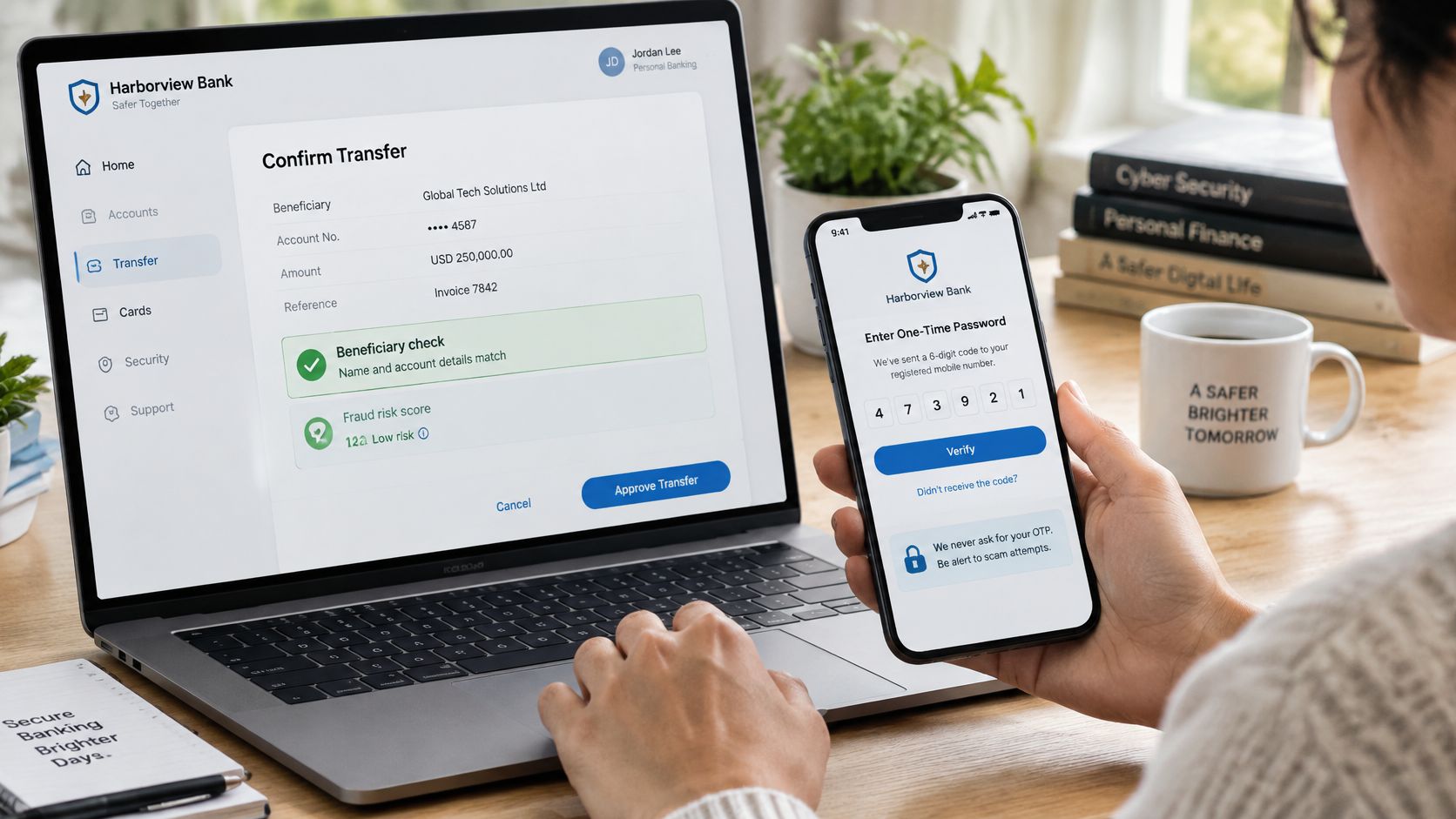
Extra authentication can feel inconvenient when a supplier is waiting. Keep it in place. One-time passwords, beneficiary checks and approval controls help distinguish an authorised instruction from someone using stolen access or misleading payment details.
Treat payment authorisation as a separate decision from preparing the invoice.
Recognise the request before approving it
A caller asks you to raise your limit. Someone claiming to be from the bank says an urgent increase is necessary to protect or move your money. End the call and contact the bank using a number you already hold, not the number the caller provides.
A supplier changes banking details before payment. An email supplies a replacement account just as an invoice becomes due. Confirm the change with a known supplier contact using previously verified contact details, not the details in the new email.
An internal request bypasses approvals. A message appearing to come from an executive asks you to release a confidential or urgent payment outside the usual process. Verify the instruction directly and keep the required independent approval in place.
A person who can prepare an invoice shouldn't automatically be able to change the recipient and release the payment alone. Where your banking arrangements support it, separate beneficiary maintenance, payment preparation and approval.
Keep authentication private
Never disclose your full banking password or PIN to a caller or message sender. Enter authentication details only through the bank's genuine channels, and read the amount and recipient shown in an approval prompt before accepting it.
Confirm a legitimate limit change in the bank's own authenticated environment. If an unexpected prompt appears, stop and contact the bank rather than approving it to clear the screen.
At Zaro, we're FIC registered and meet FICA requirements for anti-money laundering and know-your-customer compliance. Verification documents form part of that compliance process. They aren't a reason to share banking credentials, and no payment deadline should persuade your team to abandon its approval rules.
Confirm Your Limit Before Your Next Payment
Make the final check against the payment you're about to send, not a general account allowance. A saved screenshot from an earlier transaction won't tell you whether today's recipient, channel and approval requirements are ready.
Use a short pre-payment routine:
- Confirm the available allowance. Check the per-transaction, daily and beneficiary controls in the channel you'll use, including payments already submitted.
- Check the payment category. Establish whether cross-border information requirements or large-value handling affect the instruction.
- Assemble the payment file. Keep the invoice, contract and verified beneficiary record together, with consistent names and payment-purpose details.
- Resolve exceptions early. Request an increase or bank-assisted route before the due date, and obtain confirmation that it's effective.
- Check business approvals. Ensure the required authorised users can review and release the payment without bypassing the account mandate.
Plan the funding step too
Businesses comparing cross-border providers should include the originating bank transfer in their planning, not just the onward international payment. At Zaro, our process is to sign up, complete Know Your Business verification, fund your ZAR and USD accounts by bank transfer, then make and receive cross-border payments.
We onboard companies in South Africa after a KYB check and serve businesses only. Individuals should continue using their own bank's personal payment channels.
The practical decision is simple: confirm your limit today, not on the day the payment is due. Give your finance team enough time to resolve the actual constraint, whether that's an allowance, an approval or a missing document.
Zaro offers South African businesses cross-border payments with low FX spreads, no SWIFT fees and bank-grade security. Visit Zaro to explore business onboarding and plan your ZAR and USD account funding alongside your sending bank's transfer limits.